
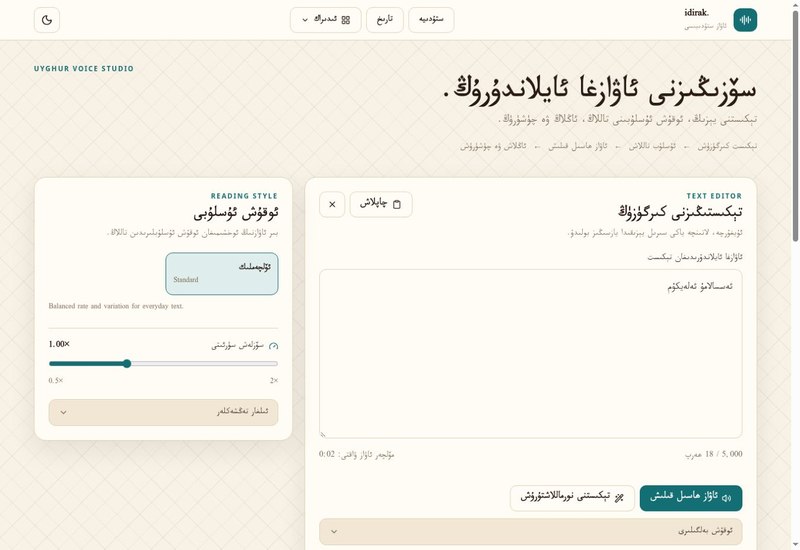
What is this tool?
Text to Speech (TTS) uses AI to turn written Uyghur into natural-sounding speech.
What is it used for?
Turning text into speech opens content to people who struggle to read, people with low vision and anyone who wants to listen on the move. It is also used to read books aloud to children.
How is it used?
Paste your text, choose a reading style and generate the audio. Correct punctuation makes the voice sound noticeably more natural, because the model pauses at punctuation marks.
Who is it for?
People with low vision, audiobook makers, teachers and content creators.
Getting started
- Type Uyghur text or paste it from the clipboard.
- Choose a reading style.
- Generate the audio, listen in the player and download the audio file if you need it.
- Audio you generated earlier stays in your history, where you can reopen, regenerate or delete it.
Frequently asked questions
- What is TTS?
- TTS (text to speech) turns written text into speech that sounds like a human voice. Current AI models can also make intonation and pauses sound natural.
- What if the Uyghur voice does not sound natural?
- Put commas and full stops in the right places, split long sentences, and try writing loanwords the way they are pronounced in Uyghur. These noticeably improve the intonation.
- Can I download the generated audio?
- Yes. Use the download button in the player to save the audio file.
Also known as
- تېكىستنى ئاۋازغا
- Tékistni awazgha
- Текистни авазға
- Text to Speech
- ئۇيغۇرچە ئاۋاز ھاسىللاش
- TTS ئۇيغۇرچە
- Uyghurche tékist awazgha
- Uyghur text to speech
- Uyghur TTS
Terms behind this tool
Related articles
Speech AI — Complete Guide to ASR and TTS
How speech recognition and speech synthesis work, why Uyghur is hard, and how to improve results
AIDeepfakes — How to Spot Fake Images, Video and Voices
What deepfakes are, how voice-clone and video-call scams work, why spotting them by eye fails, and how C2PA, SynthID and simple verification habits help — with FTC and NIST sources.
Related Tools
Yardem
Visual AI agent workflow builder and orchestrator — drag, drop and connect agents to automate tasks.
AI Model
The Uyghur-first UyghurAI model family and its roadmap.
AI OCR
Extract text from images & PDFs with AI. Supports 18+ languages including Uyghur.
Oghuz AI
AI translation between Uyghur and other Turkic languages.