
U
Productivity
Uyghur Calendar
Manage your schedule with the Uyghur calendar. Includes month, week and day views.
What is this tool?
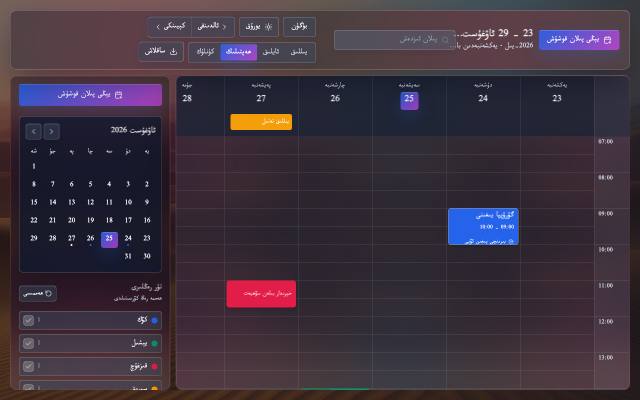
Uyghur Calendar is a calendar entirely in Uyghur for managing your plans in year, month, week and day views. Month and weekday names are in Uyghur, and the layout reads right to left.
What is it used for?
Most calendar apps offer no Uyghur. Planning in your own language makes everyday organisation easier and more personal, and you don't need an account.
How is it used?
Press "Add new plan" and enter a title, date, start and end times, a location and notes. Give each plan a colour, a priority and a repeat (daily, weekly, monthly or yearly). Drag a plan to move it to another day or time.
Who is it for?
Anyone who wants to manage daily tasks, study or work plans in Uyghur.
Getting started
- Choose the year, month, week or day view.
- Press "Add new plan" and enter the title, time and location.
- Choose a colour, priority and repeat, then save.
- Export your plans as a JSON or iCal file for a backup.
Frequently asked questions
- Where are my plans stored?
- In your own browser, with no account needed. That means they don't move to other devices on their own, so export a JSON file as a backup and import it again later.
- Can I move my plans to another calendar app?
- Yes. Export an iCal file from the Save / Import menu; apps that support iCal, such as Google Calendar and Outlook, can import it.
Also known as
- ئۇيغۇرچە كالېندار
- Uyghurche kaléndar
- Уйғурчә календар
- Uyghur Calendar
- ئۇيغۇرچە پىلان
- Uyghurche kalendar